Visprint, the Visual Fingerprint Generator
- The Basic Idea
- The history of Visprint
- Using the Program
Visprint is a program which makes a fractal image based on the contents of any file. The image will be different for almost every file with even slightly different contents. I say "almost" because I haven't gone to the trouble to do any mathematical proofs, but I've certainly never seen any two that looked alike. Actually, the program produces slightly different images for the same file when run multiple times. The structure looks the same on these images, but the magnification varys a little. This is an artifact of the process used to create the images.
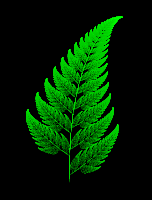 Visprint uses the IFS fractal generation process, pioneered by Michael Barnsley. It is a way to create images which are self-similar to infinite depths. In other words, the picture is made up of smaller versions of itsself. The traditional and best-known IFS fractal is Barnsley's Fern (shown at left). You can see in that image that the fern's individual leaves are just miniature versions of the full-size fern. You could zoom in forever and continue to see the same similarity.
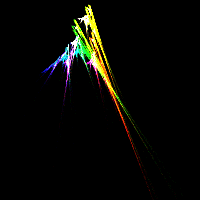 To the right you can see the Visprint fingerprint for this web page (I also put a fingerprint at the bottom of this and every one of my pages). If you look closely, you should be able to see that it's made up of four shapes, one predominantly red, one green, one blue, and one yellow. Each of the shapes is just a skewed version of the whole. Cool, huh?
Visprint was originally written by Ian Goldberg. I found out about it through Wired Magazine in an article which I can no longer find on their web site. The original visprint page (wherein you can find the original version and some info from the author) introduced me to the program, and I downloaded and compiled it. It was cool.
For a long time I had the idea to include a fingerprint at the bottom of all my web pages. In August 1998, when I decided to revamp my pages, I got the urge again. This time I downloaded the program again, compiled it, spent an entire day tracking down a bug which ended up being a silly problem I had encountered a dozen times before in porting Unix softwere to DOS (namely, text mode vs. binary mode in file IO). After fixing the bug, I added the ability to specify background color, image resolution, and color intensity on the command line. I also optimized the positioning and magnification of the fractal so that there isn't any wasted space in the image.
And the result is a revamped, but still not totally user-friendly Visprint. If anyone shows some interest by emailing me about it (hint hint) then I will probably get up the enthusiasm to make the program nicer to use, as well as have a few more features.
I wrote this version of Visprint for the MinGW32 version of the GNU C compiler. It will also compile (I think) on Microsoft Visual C++ or any unix system with GCC. You can get either the source code or the Win32 console-mode executable.
Visprint takes an MD5 checksum as its input. This is basically a 32-byte number which is generated from a file. In order to generate the checksum, you will also need md5sum.exe (win32 console executable) or the source code (unix -- you may already have it on your system, though). To create your own picture, do something like the following:
md5sum foo.bar | visprint > foo.ppm
This uses the file foo.bar as a source, and creates a picture called foo.ppm. You can change the options as follows:
| Switch | Possible Values (default) | Explanation |
|---|---|---|
| Use the alternate coloring method. | ||
| create a black-and-white image. No greys or colors will be used if you use this option. | ||
| Use the given value for both the x and y resolutions. The calculation time will quadruple every time you double this value. | ||
| Use the given number of equations in calculating the fractal. This switch is untested! I really don't know what'll happen if you specify more than 4. 1 will produce a blank image. 0 probably will break the program. What does that say about my CS education? | ||
| Use the given intensity of color. With a black background, a higher intensity produces a brighter image. With a white background, higher intensity produces a darker image. In all cases, calculation time doubles every time you double the intensity. | ||
| Use the given background brightness. 0 means black, 255 means white. Try other values at your own risk. I don't know what it'll do. |
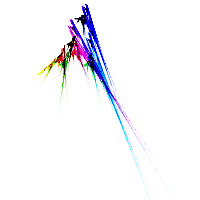 As an example, the following invocation might produce the image at the right (with a white background, 30 intensity, 200x200 resolution, the normal coloring, and 4 equations):
md5sum index.html | visprint -r200 -b255 -i30 >foo.ppm
You'll probably need a graphics viewer/converter to actually use the image for anything. It's in Portable Pixmap format, a raw 24-bit format common to unix machines. I would suggest Display (DOS) or XV (unix).